Welcome to Pychop’s documentation!
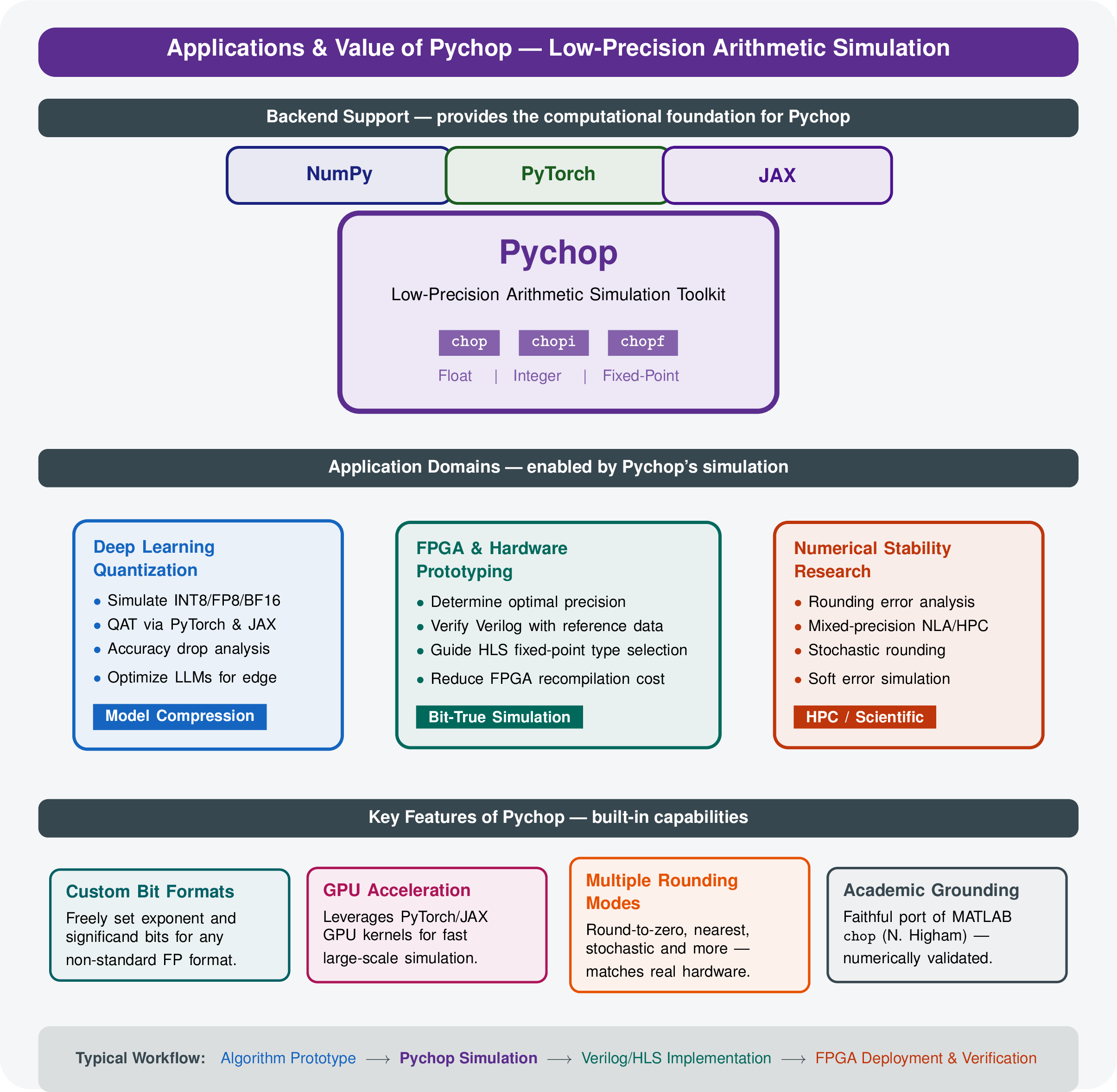
Using low precision can achieve extra speedup while reducing storage and energy costs. The intention of Pychop, motivated by the software chop in Matlab developed by Nick Higham, is to simulate the low precision formats based on single and double precisions, which are prevalent on modern machines. Pychop is a Python package for simulating low precision and quantization in modern machines. It supports NumPy, Torch, JAX, or TensorFlow backend.
Pychop mainly contains three modules for quantization simulation:
Chop:for low precision floating point simulationChopi: for integer quantizationChopf: for fixed point quantization

Features
The Pychop class offers several key advantages that make it a powerful tool for developers, researchers, and engineers working with numerical computations:
Customizable Precision
Users can specify the number of exponent (exp_bits) and significand (sig_bits) bits, enabling precise control over the trade-off between range and precision. For example, setting exp_bits=5 and sig_bits=4 creates a compact 10-bit format (1 sign, 5 exponent, 4 significand), ideal for testing minimal precision scenarios.
Multiple Rounding Modes
Supports a variety of rounding strategies, including deterministic (toward_zero, nearest_even, nearest_odd) and stochastic (stochastic_prop, stochastic_equal) methods. This flexibility allows experimentation with different quantization effects, which is crucial for machine learning models where rounding impacts training dynamics and inference accuracy.
Hardware-Independent Simulation
Emulates low-precision arithmetic within standard float32 or float64 precision, eliminating the need for specialized hardware. This makes it accessible for prototyping and testing on any PyTorch-supported platform, from CPUs to GPUs, without requiring custom FPGA or ASIC implementations.
Support for Denormal Numbers
The optional support_denormals parameter enables handling of subnormal numbers, extending the representable range near zero. This is particularly valuable for applications requiring high fidelity at small magnitudes, such as scientific simulations or deep learning with small gradients.
GPU Acceleration
Leveraging PyTorch’s tensor operations and device support (device parameter), Pychop can run efficiently on GPUs. This allows for fast, vectorized processing of large datasets, making it suitable for large-scale experiments in machine learning and numerical optimization.
Reproducible Stochastic Rounding
The seed parameter ensures reproducibility in stochastic rounding modes, critical for debugging and comparing results across runs. This is a significant advantage in research settings where consistent outcomes are needed to validate hypotheses.
To ensure consistency with MATLAB’s chop software, Pychop closely follows its API. For the first four rounding modes, it produces identical results given the same user-defined parameters. For stochastic rounding modes (rmode 5 and 6), both tools yield the same output when provided with identical random numbers.
Ease of Integration
Built on PyTorch, the class integrates seamlessly with existing PyTorch workflows, including neural network training pipelines and custom numerical algorithms. The input value can be any array-like object, automatically converted to a tensor, enhancing usability.
Installation guide
Pychop has the following dependencies for its functionality:
numpy>=1.21
pandas>=2.0
torch (only for Torch use)
jax (only for JAX use)
tensorflow (only for TensorFlow use)
To install the current release via PIP use either of them according to one’s need:
pip install pychop
To check if the instalment is successful, one can load the package, simple use
import pychop
Floating point information
To give a shot, one may print information of various precision formats:
from pychop import float_params
float_params()
Note
The documentation is still on going. We welcome the contributions in any forms.
Contents:
- Quick start
- Float precision arithmetic
- Built-in low-precision types
- Linear algebra wrappers
- Mathematical functions
- Integer quantization
- Fixed point quantization
- Block Floating Point Formats
- Microscaling formats
- Overview
- Architecture
- Key Features
- MX Format Specification
- Structure
- Predefined Formats
- Quick Start
- API Reference
- Utility Functions
- PyTorch Backend (QAT)
- Quantizer with STE
- Quantized Linear Layer
- Quantized Attention
- Model Conversion
- LLM Fine-tuning
- JAX Backend
- Quantizer with Custom VJP
- Quantized Dense Layer (Flax)
- Advanced Usage
- Fine-grained Control
- Block Size Selection
- Performance Tips
- Accuracy vs Compression
- Training Recommendations
- Troubleshooting
- References
- Summary
- Quantized layers module
- Floating-point / Fixed-point quantized layers
QuantizedLinearQuantizedConv1dQuantizedConv2dQuantizedConv3dQuantizedConvTranspose1dQuantizedConvTranspose2dQuantizedConvTranspose3dQuantizedRNNQuantizedLSTMQuantizedGRUQuantizedMaxPool1dQuantizedMaxPool2dQuantizedMaxPool3dQuantizedAvgPool1dQuantizedAvgPool2dQuantizedAvgPool3dQuantizedAdaptiveAvgPool2dQuantizedBatchNorm1dQuantizedBatchNorm2dQuantizedBatchNorm3dQuantizedLayerNormQuantizedInstanceNorm1dQuantizedInstanceNorm2dQuantizedInstanceNorm3dQuantizedGroupNormQuantizedMultiheadAttentionQuantizedEmbeddingQuantizedAttentionQuantizedAvgPool- Activation & Regularization Layers (Floating-Point)
- Integer quantized layers
IQuantizedLinearIQuantizedConv1dIQuantizedConv2dIQuantizedConv3dIQuantizedConvTranspose1dIQuantizedConvTranspose2dIQuantizedConvTranspose3dIQuantizedRNNIQuantizedLSTMIQuantizedGRUIQuantizedMaxPool1dIQuantizedMaxPool2dIQuantizedMaxPool3dIQuantizedAvgPool1dIQuantizedAvgPool2dIQuantizedAvgPool3dIQuantizedAdaptiveAvgPool1dIQuantizedAdaptiveAvgPool2dIQuantizedAdaptiveAvgPool3dIQuantizedBatchNorm1dIQuantizedBatchNorm2dIQuantizedBatchNorm3dIQuantizedLayerNormIQuantizedInstanceNorm1dIQuantizedInstanceNorm2dIQuantizedInstanceNorm3dIQuantizedGroupNormIQuantizedMultiheadAttentionIQuantizedEmbedding- Integer activation & regularization layers
- Usage Example
- Post-training quantization (PTQ)
- TensorFlow / Keras Quantized Layers
- Post-Training Quantization
- Overview
- PTQ Methods Comparison
- Quantization Components
- Basic PTQ:
post_quantization - Static PTQ:
static_post_quantization - Dynamic PTQ:
dynamic_post_quantization - Mixed-Precision PTQ:
mixed_post_quantization - Example 1: ResNet-18 INT8 PTQ (PyTorch)
- Example 2: BERT-Base W8A16 PTQ (PyTorch)
- Example 3: Vision Transformer (ViT) PTQ (JAX)
- Example 4: Comparing Calibration Methods
- Best Practices
- 1. Choosing PTQ Method
- 2. Calibration Data Guidelines
- 3. Conv+BN Fusion (PyTorch)
- 4. Percentile Selection
- 5. JAX Backend Tips
- Common Issues
- References
- Quantized optimizers module
- Support in Matlab
- License